AI product · LLM agents
Edico
An AI-assisted LaTeX editor for scientific papers: every AI change arrives as a diff the author accepts or rejects, behind integrity guardrails.
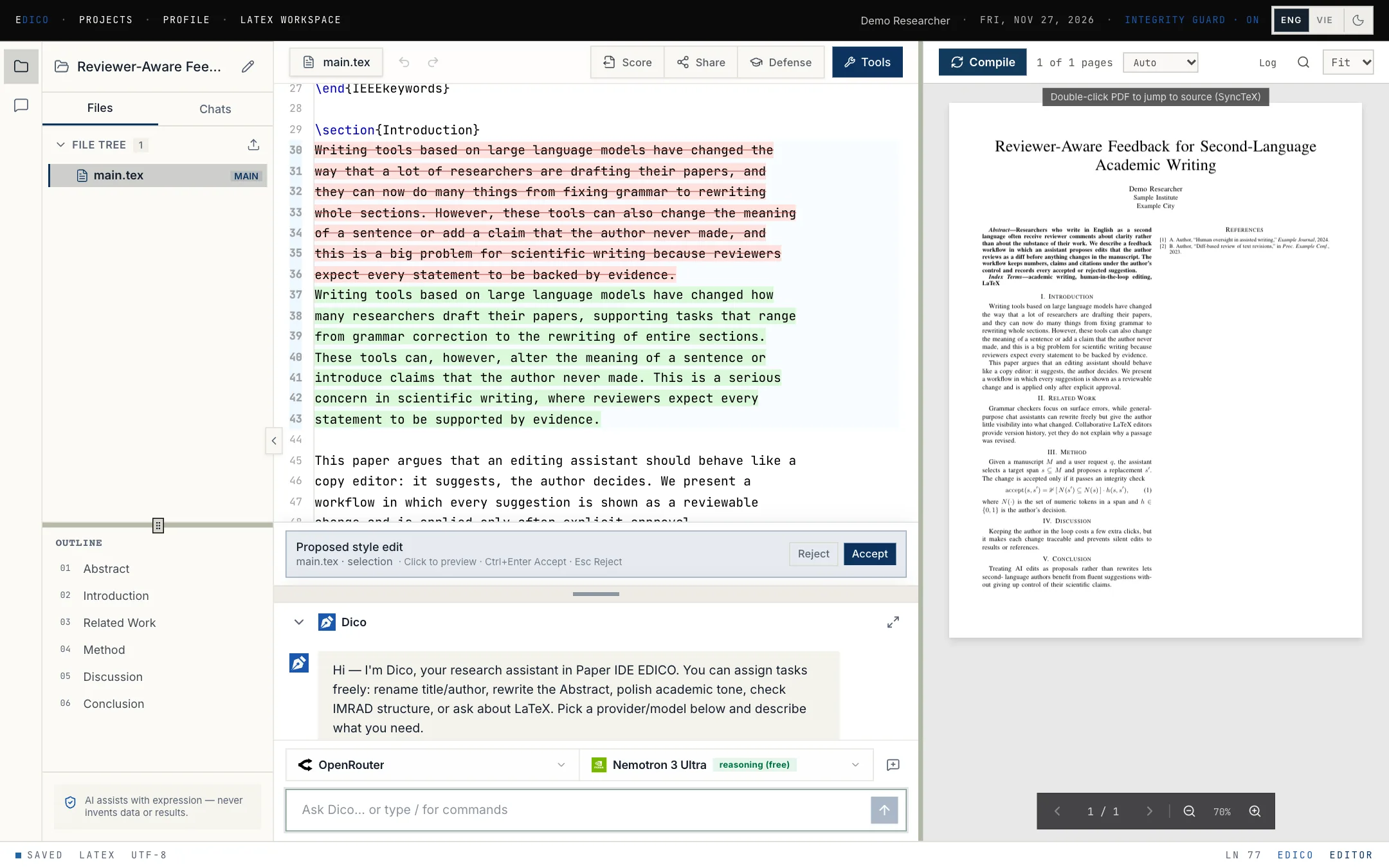
Dico proposes a style edit as a diff; nothing reaches the manuscript until the author accepts it.
- pytest test functions, plus ~220 Vitest cases
- 935
- pytest test functions, plus ~220 Vitest cases
- submission preflight rules
- 29
- submission preflight rules
- CI workflows (tests, security, Docker, LaTeX, release)
- 5
- CI workflows (tests, security, Docker, LaTeX, release)
- of the backend written by me (git blame)
- ~76%
- of the backend written by me (git blame)
Overview
Edico is a browser LaTeX editor with an AI editor, Dico, built in. Researchers ask Dico to polish a paragraph, restructure toward IMRaD, fix citations or switch templates; Dico streams a proposal, and the change appears as a diff the author must accept or reject.
Around the editor sit the tools you need before submitting: server-side compile with PDF preview and SyncTeX, a citation verifier, a logic audit, a 29-rule submission preflight, and Defense Mode — a mock viva against an AI committee.
The problem
Researchers writing in English need help bringing papers up to publication standard, but generic LLM rewriting can silently change numbers, invent citations or shift scientific meaning.
Who it's for
- Researchers and graduate students writing papers in LaTeX — especially Vietnamese authors writing in English.
- Admins running the platform, who manage model keys, quotas and cost.
What it does
Human gate for every edit
An intent router sends each request to a style, edit, structure, citation or logic path; the result streams over SSE and lands as an accept/reject diff, with every decision kept in an audit log.
Integrity guardrails
Numeric-drift and length checks with retry, prompt-injection detection, scope limits and output sanitizing — numbers are normalized first, so 92.40 and 92.4 don't trigger false alarms.
Citation verifier
Checks references against arXiv, Crossref, Semantic Scholar and OpenAlex with LaTeX-aware fuzzy title matching, concurrently over one shared HTTP client and cached.
Sandboxed compile
pdflatex / xelatex / lualatex with latexmk and biber, SyncTeX, delta asset uploads and a PDF cache — with shell escape off, file access restricted and an environment allowlist.
Defense Mode
A mock viva: an AI committee asks questions linked to passages in your PDF. Streaming is cancellable, and a cancelled turn isn't charged against the quota.
Platform plumbing
Email + JWT and Google SSO, an admin console with LLM cost reporting, encrypted platform keys with provider failover, FREE/PRO quotas, share links and a mobile editor.
How it's built
A React 19 / TanStack Start app talks to FastAPI over REST, SSE and WebSocket. The backend holds the agents, guardrails and compile service; PostgreSQL stores papers, suggestions, citations and the audit log.
- 1
Request
Regex intent rules first, then an LLM intent classifier with a timeout; an edit planner fixes the scope (title, section, selection, document).
- 2
Agent
Prompted agent or the LangGraph graph (route → parse → style / edit / citation / structure / logic → integrity → respond), with provider failover.
- 3
Guardrails
Prompt-injection check, numeric-drift and length checks with retry, scope and output sanitizing.
- 4
Diff gate
Streamed to the editor as a pending edit; Accept or Reject is recorded with the revision.
- 5
Compile
Sandboxed TeX Live builds the PDF; SyncTeX links PDF and source both ways.
Engineering challenges
Isolating users' compile workspaces
Problem
The compile cache key could be shared across users through client-supplied cache ids, share tokens and the constant hash of an empty asset list.
Solution
Bound the workspace key to a digest of the owner, reproduced the leak in the fix's commit, and added tests.
Running untrusted LaTeX on a server
Problem
A LaTeX document can read files, run shell commands or exhaust resources.
Solution
Shell escape disabled, file reads and writes restricted, secrets kept out of the TeX environment, a body-size cap, and rate limits keyed on verified identity rather than a spoofable header.
Long streams on Cloud Run
Problem
Logic audits and viva turns can outlive the platform's request timeout, and disconnects could still burn quota.
Solution
Kept stream budgets under the limit, padded SSE chunks, cancelled in-flight work on disconnect, and made quota consumption atomic with row locks.
My role
- Architected the system and wrote most of it: 276 of 316 commits; about 76% of today's backend, 84% of the frontend and 91% of the tests by git blame.
- Built auth (JWT + Google SSO), the admin console, Defense Mode, the mobile UI, the citation verifier and the CI pipeline; co-built the agent pipeline and guardrails with a teammate.
- Deployed it to Google Cloud Run and ran production checks there in mid-2026; later continued it as a personal project, with AI coding assistants in the workflow.
Current scope
Edico ran on Google Cloud Run in June–July 2026 and is offline now; the source is public.
Plans and quotas are implemented, but checkout is a demo — no payment gateway is connected. Screens on this page come from a local run; AI text in them is from a stand-in model.
Product gallery
Real captures. Click to enlarge.
The human gate: a proposed style edit, shown as a diff beside the compiled PDF. Multi-file LaTeX workspace with server-side TeX Live compile and SyncTeX jump-to-source. Defense Mode — rehearse a viva against an AI committee that cites passages of your PDF. Admin console: usage, LLM cost, quotas and platform model policy. Start from IEEE, Springer LNCS or Elsevier templates. Marketing site with an interactive editing demo. Mobile workspace — Files, Editor and Preview tabs. Editing LaTeX on a phone, with the assistant one tap away.